Repair Shop Management Software: The Complete Guide
Running a repair shop in 2026 means constantly juggling device intake, customer communications, parts inventory, and accounting obligations. Without the right tool, errors multiply, time vanishes, and profitability erodes. Dedicated management software changes everything: it centralises information, automates repetitive tasks, and gives you a clear picture of your business.
This guide covers everything you need to know to choose the right solution for your shop, from essential features to common pitfalls.
Why dedicated software matters
Many repair shop owners start with a spreadsheet or a generic business tool. It works for the first few months, then the cracks appear. Repair tickets pile up in a hard-to-filter Excel file, stock levels depend on a technician's memory, and invoices are created manually in a separate application.
The first advantage of dedicated software is centralisation. The entire repair cycle (intake, diagnosis, parts ordering, repair, invoicing, return to customer) lives in a single environment. Every team member accesses the information they need without duplicates or data loss.
The second advantage is automation. Automatic SMS or email notifications when a repair status changes, stock updates when a part is consumed, invoice generation that complies with local tax regulations: these are all actions that, when done manually, eat up several hours each week.
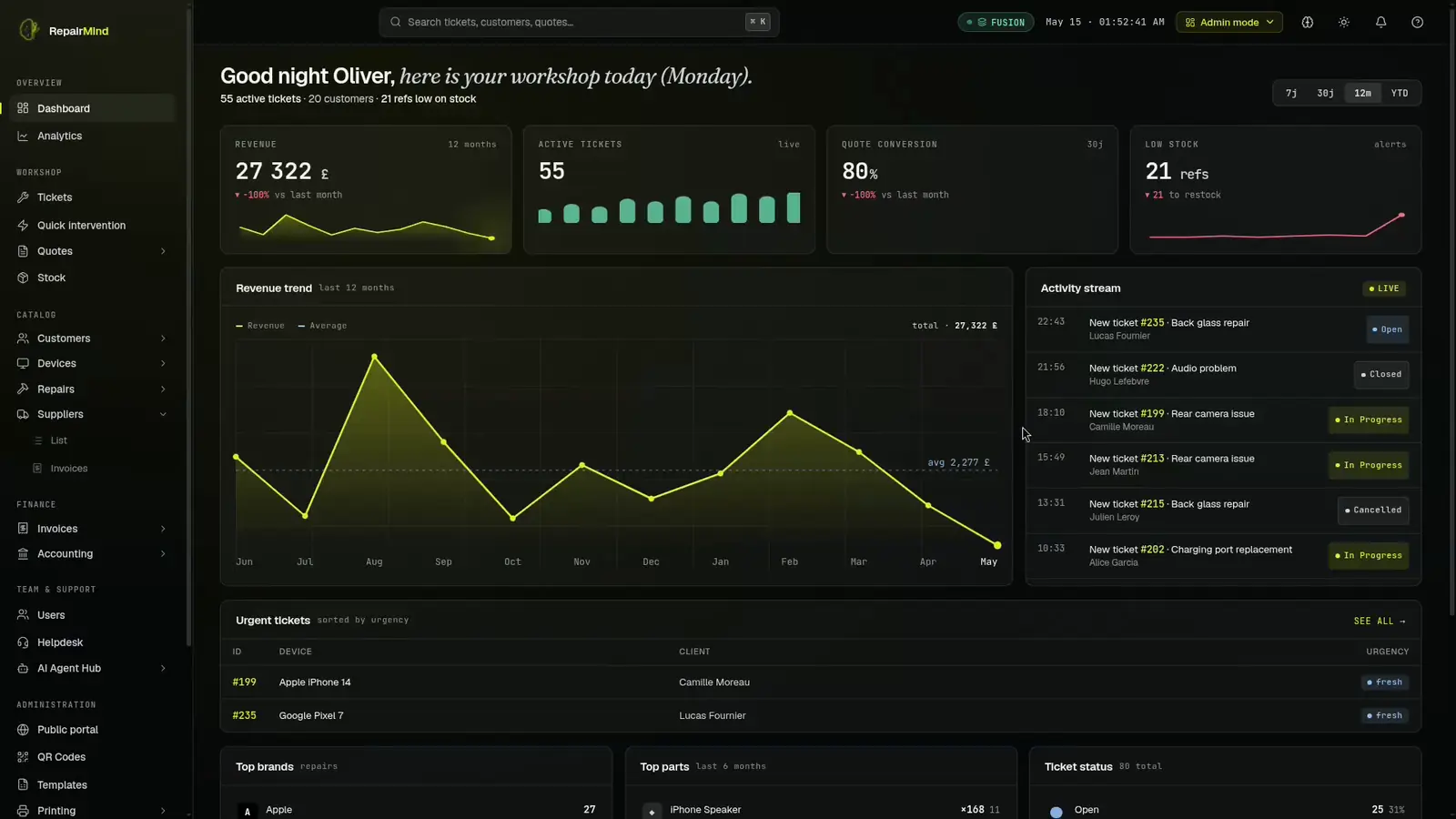
Finally, specialised software provides real-time oversight. Repair success rates, average turnaround time, revenue by repair type or by technician: these metrics help you make informed decisions and quickly identify bottlenecks.
Essential features
Ticket management (ticketing)
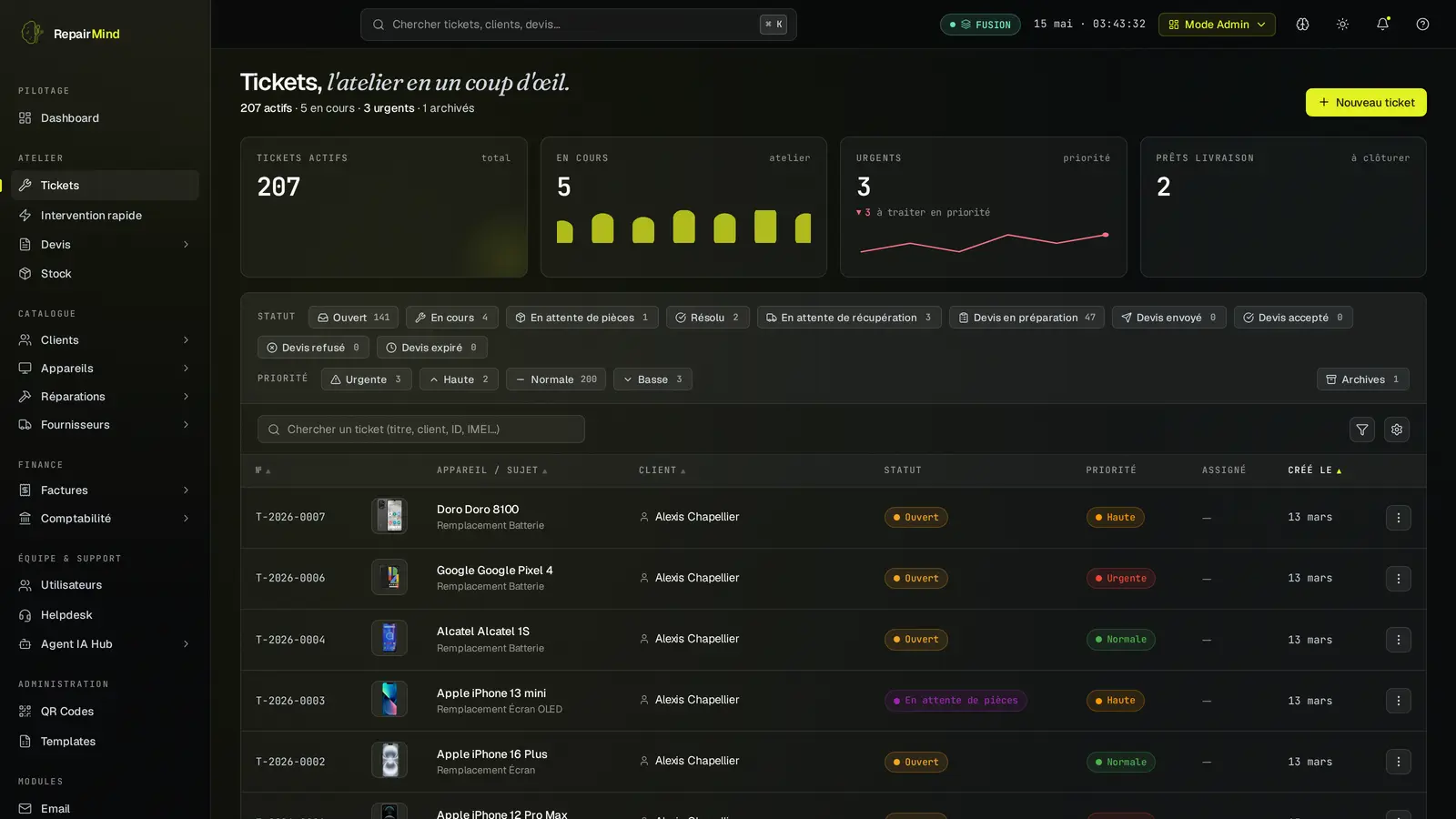
The core of every repair shop. Each incoming device should have a unique ticket that tracks its entire journey: condition at intake, diagnosis, required parts, time spent, current status, and full history. The customer, meanwhile, should be able to track progress without having to call.
Key ticketing features include quick creation (serial number or IMEI scan), customisable statuses, before/after photos, internal notes, and a tracking link automatically sent to the customer.
Inventory and parts management
A missing part can stall a repair for days. The software must track stock levels in real time, trigger reorder alerts, and manage multiple suppliers. Purchase price history helps negotiate better terms and calculate precise margins.
Ideally, inventory is linked to ticketing: when a technician consumes a part on a ticket, stock updates automatically and the part cost appears on the quote or invoice.
Invoicing and compliance
A repair shop issues dozens of invoices every week. The software should generate quotes, convert them to invoices once the customer approves the repair, handle different VAT rates, and produce accounting exports. In France, compliance with anti-fraud legislation (NF525 or equivalent) is mandatory for invoicing software since 2018. In the UK, Making Tax Digital (MTD) imposes its own requirements.
Tax compliance
Invoicing software must meet local fiscal requirements: NF525 in France, MTD in the UK, and local VAT rules in Switzerland. Make sure the solution you choose provides the relevant compliance certifications for your jurisdiction.
Customer relationship management (CRM)
An integrated CRM keeps the complete history of each customer: devices entrusted, past repairs, accepted or rejected quotes, and communication preferences. This view enables personalised interactions, relevant warranty extension offers, and follow-ups on unanswered quotes.
Automatic notifications (SMS, email) when a repair status changes significantly improve customer satisfaction while reducing inbound calls.
Dashboards and reporting
Managing a shop by gut feeling works at a small scale but becomes risky as activity grows. Dashboards should provide at minimum: real-time revenue, open and closed ticket counts, average repair turnaround, quote-to-invoice conversion rate, and per-technician performance.
Exportable reports (CSV, PDF) are necessary for accounting and financial analysis. Some software also offers reports on the most frequent faults, which helps anticipate parts orders.
Pitfalls to avoid
Using generic tools
A generic ERP or standard business management application may look appealing because of its broad feature set. In practice, it does not handle the concept of a repair ticket, cannot track a device through each stage of the process, and requires expensive customisation. The time lost adapting a tool not designed for repairs quickly exceeds the cost of a dedicated solution.
Ignoring vendor lock-in
Some solutions make exporting your data difficult or even impossible. Before committing, verify that you can export all your data (customers, tickets, invoices, inventory) at any time in a standard format. A vendor that refuses or complicates data export is a major red flag.
Also check cancellation terms: a long-term commitment with annual price increases can become a burden if the product does not deliver on its promises.
Neglecting mobile access
A technician on the move (on-site repair, trade show, event) needs to access the software from a smartphone or tablet. If the tool only works on a desktop computer, you lose responsiveness and flexibility. Prefer solutions accessible via web browser with no installation required on each workstation.
Underestimating training
A powerful tool that is poorly understood is a useless tool. Make sure the vendor offers clear documentation, responsive support, and ideally an onboarding process for your team. The hidden cost of difficult-to-learn software is measured in hours of lost productivity.
How to evaluate repair shop management software
Selecting software should not be done by comparing feature lists alone. Here is a structured approach to making the right choice.
- List your priority needs. Identify the three or four problems that cost you the most time today. They will guide your selection.
- Test under real conditions. A marketing demo is not enough. Create real tickets, enter real parts, generate a quote and an invoice. Count the number of clicks required for everyday actions.
- Evaluate support quality. Ask a technical question before buying. The response time and quality say more than a page of testimonials.
- Check interoperability. The software should integrate with your accounting system, your payment processor, and ideally your parts suppliers.
- Plan for growth. If your shop goes from two to ten technicians, will the software keep up? What is the cost per additional user?
Quick checklist
Dedicated ticketing, stock management linked to tickets, compliant invoicing, integrated CRM, mobile access, data export, responsive support, transparent pricing. If a solution ticks all these boxes, you have a serious contender.
What Next-Generation ERPs Bring to the Table
Beyond basic features, some solutions push automation much further. Here are the innovations that make the difference in 2026:
AI integrated natively, not bolted on as a plugin
The best software integrates artificial intelligence into every module from the ground up. For example, RepairMind uses AI to automatically extract data from your supplier invoices: if a device or part doesn't yet exist in your catalogue, the system creates it automatically with its characteristics and compatibilities. Your database grows with every import, without manual entry.
Shared knowledge base across workshops
Imagine opening your software and finding over 960 devices already catalogued, with their spare parts and standard repairs. That's the principle of a collaborative knowledge base: every workshop benefits from data enriched by the community. You don't start from zero, and your technicians can create tickets immediately.
The MCP protocol: your ERP talks to AI agents
The Model Context Protocol (MCP) is an emerging standard that allows AI agents to interact directly with trade-specific software. RepairMind is one of the first repair ERPs to integrate an MCP server: an AI assistant can check your open tickets, create a client, verify your fiscal chain integrity, or analyse your activity in natural language. This is not a limited chatbot -- it's an AI connected to your real data.
Open architecture and isolated data
RepairMind is built on a Clean Architecture (Node.js, React, PostgreSQL) with full tenant isolation: each workshop has its own database. No vendor lock-in, exportable data, and native interoperability with the AI ecosystem via MCP.
Towards a structured and profitable workshop
The right management software is not the one with the most features, but the one that fits naturally into your shop's daily routine. It reduces errors, speeds up repair processing, improves communication with your customers, and gives you the data you need to manage your business with confidence.
Investing in the right tool pays for itself quickly: less administrative overhead, fewer lost parts, fewer customer disputes, and better financial visibility. The return is measured not only in currency but also in peace of mind and the professionalism your customers perceive.
Ready to streamline your shop?
RepairMind is an ERP built exclusively for repair shops. Shared knowledge base, native AI, built-in MCP server, per-tenant data isolation: everything is designed for demanding repairers.
Request a demo